



Cream and paprika, Menu with diet columns
ProMenu with diet columns
Authored font stack with theme and device fallbacks
Add WordPress listing patterns for jobs, events, episodes and documents: repeating ruled rows with a date, a title, a fact or two and one link.
28 patterns shown
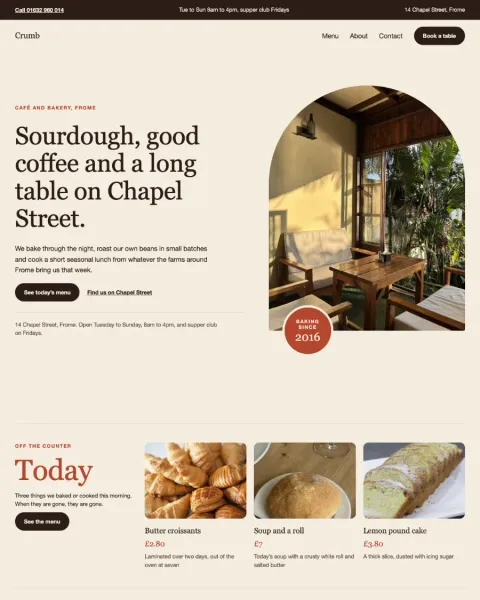
Crumb Café and bakery
See Crumb as whole pagesMend Physiotherapy clinic
See Mend as whole pagesVow Wedding website
See Vow as whole pagesBough Tree surgeon
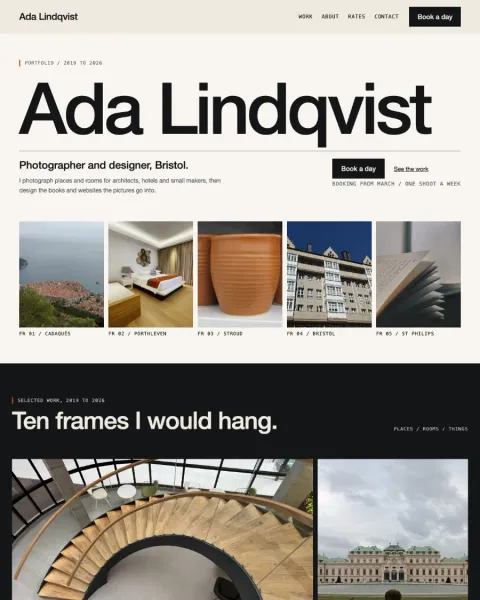
See Bough as whole pagesFolio Freelance photographer and designer
See Folio as whole pagesTape Podcast
See Tape as whole pagesCounsel Law firm
See Counsel as whole pagesMenu with diet columns
Authored font stack with theme and device fallbacks
Fixtures on the centre line
Authored font stack with theme and device fallbacks
Listings feature episode
Authored font stack with theme and device fallbacks
Listings feature episode
Authored font stack with theme and device fallbacks
Listings season rows
Authored font stack with theme and device fallbacks
Event ticket stack
Authored font stack with theme and device fallbacks
Weekly class ribbon
Authored font stack with theme and device fallbacks
Menu counter slip
Authored font stack with theme and device fallbacks
Menu tasting route
Authored font stack with theme and device fallbacks
Price list treatments
Authored font stack with theme and device fallbacks
Price list treatments
Authored font stack with theme and device fallbacks
Price list treatments
Authored font stack with theme and device fallbacks
Careers vacancies
Authored font stack with theme and device fallbacks
Menu course columns
Authored font stack with theme and device fallbacks
Menu single sheet
Authored font stack with theme and device fallbacks
Product spec cards
Authored font stack with theme and device fallbacks
Listings cover programme
Authored font stack with theme and device fallbacks
Try a shorter search or choose another category.
Showing 1–28 of 28 · Featured first
Looking for sections that move? 58 interactive patterns on their own page
Any theme
The same section in each theme below, word for word. The pattern brings the layout; the colours and fonts are the theme’s, so it matches the rest of your site.
28 patterns
| Pattern | What it is | Notable blocks | Variations | Access |
|---|---|---|---|---|
| Careers vacancies | Open roles as ruled rows for a local employer. | Columns, Group | 2 | Subscription |
| Course curriculum | Six course modules as a ruled stack of core/details, each summary its hours in a bold left column and then the module name, each opening to a list of three or four lessons, the first open by default. | Details, List | 1 | Subscription |
| Event ticket stack | Three community workshop tickets form a stepped stack, each event body joined to a narrow date stub by a perforated seam. | Group | 2 | Subscription |
| Events date tiles | Upcoming events as tear-off calendar leaves. | Group | 3 | Subscription |
| Fixtures on the centre line | A sports club's results and next matches as ruled rows down the middle of the page. | Group | 2 | Subscription |
| Listing cards | Six priced items as a grid of cards, each a 4. | Image | 3 | Free |
| Listing rows | A repeating ruled row for any index a visitor scans and acts on. | Separator | 4 | Free |
| Listings cover programme | An event poster as a full-bleed cover. | Cover | 3 | Subscription |
| Listings feature episode | The newest item given a whole band above the list it belongs to. | Media & Text | 3 | Subscription |
| Listings next rows | A short list of what to hear next at the foot of a single item. | Group | 2 | Subscription |
| Listings season rows | A whole archive grouped under full-width bars, each bar naming its season, each item one ruled row of a big number, a title, a person, a role, a date, a length and a button, every cell centred on the row. | Group | 2 | Subscription |
| Listings start here | Three things to try first, each a square photograph with its number stamped into the top corner as a filled tab, then a title, a guest line and one sentence, under a small heading and a link to the whole list. | Cover | 2 | Subscription |
| Menu chalkboard | A menu written up like the board behind the counter. | Columns, Group | 2 | Subscription |
| Menu counter slip | An oversized order number anchors a lunch deal beside a narrow counter menu. | Columns, Group | 2 | Subscription |
| Menu course columns | A restaurant menu in three course columns. | Group | 3 | Subscription |
| Menu dish anatomy | One signature dish photographed in the middle, its four parts labelled around it. | Image | 2 | Subscription |
| Menu place card | A wedding breakfast menu set as a place card. | Cover, Separator | 2 | Subscription |
| Menu single sheet | Today's menu as a single printed card. | Separator | 3 | Subscription |
| Menu tasting route | Four tasting courses follow a winding rule across the page, each with an oversized index, a dish name and its ingredients. | Columns, Group | 2 | Subscription |
| Menu with diet columns | A restaurant menu as three core tables, one per course, where each diet has a column of its own. | Table | 2 | Subscription |
| Price list treatments | A salon, spa or clinic price list in three ruled columns. | Columns, Group | 5 | Subscription |
| Product grid, static | Four tall 3. | Image | 1 | Subscription |
| Product spec cards | Three product comparison cards in a row. | Image, List | 3 | Subscription |
| Property listing cards | Three property cards in a row under a headline and one button. | Image | 1 | Subscription |
| Specials today band | A band between two rules that leads with the word Today at display size, a line and one action, then three dishes, each a landscape photograph with its name, price and a short note. | Image | 2 | Subscription |
| Stays room blocks | Where to stay for guests travelling to an event. | Image | 2 | Subscription |
| Weekly class ribbon | A studio programme hangs three recurring classes from one continuous top rail. | Columns, Group | 2 | Subscription |
| Work index ledger | A project index kept as a ledger. | Image | 2 | Free |
Guide
People scan a listing for the one entry they want, then act on it: apply for the job, book the class, order the dish. Give every entry the same facts in the same order, and make the deciding fact, whether the date, the price or the hours, easy to find without reading the rest.
Rows suit long lists and anything sorted by date. Cards suit fewer entries where a photograph helps someone choose, such as rooms or products. A menu or price list can take on the character of the place, a chalkboard or a printed sheet, as long as each price stays on the line of its item. Take past events down promptly: one old date makes the whole page look abandoned.
Keep every row the same shape. Put the date or label first, the title second, and give each row one way in.
New to patterns? Learn how to copy and paste a pattern. Read how we test patterns.
FAQ
Open a pattern, choose a variation and press Copy pattern. In the block editor, click into an empty paragraph and press Cmd+V on Mac or Ctrl+V on Windows: the section arrives as ordinary blocks you edit like any other.
No. Each entry is ordinary blocks you edit by hand, which suits a list that changes a few times a month. For listings that change daily or take bookings, use a jobs or events plugin and keep these layouts as a guide to its look.
Each entry is its own group of blocks: duplicate one in the List View and edit the copy to add an entry, or delete one to remove it. Every entry keeps the same layout, so the list stays even.
No. All 28 are built from core WordPress blocks, so they paste into the block editor with nothing to install.
Yes. Every pattern's first variation names no colour or font of its own: it takes your theme's palette, type and spacing when pasted. 31 Styled looks bring their own colours, and each is labelled Styled.
Yes, 3, marked Free in the At a glance table on this page. They copy without an account and are among 64 free Core Patterns; a subscription opens the rest.
Subscribe
Yearly plans
Every pattern, template and theme download, and new patterns as we release them.
Checking your account.
Yearly plans
Every pattern and styled look, every theme (whole pages, a theme download, or a whole website started in one click) and the Pro plugin, on unlimited websites. The interactive patterns are on Everything.
Billed once a year
What you copy is yours forever. Not for you? We refund within 14 days.
Unlimited covers your own sites and the sites you build for clients; an account may not be pooled or resold between unrelated businesses. Everything you copy is yours to keep, forever, on any site; access to the rest of the library runs while you subscribe. Not for you? Tell us within 14 days of a payment and we refund you. After that, cancelling stops the next renewal and access runs to the end of the year you have paid for. Prices are in pounds and are the full price in the UK, the US and eleven other countries; elsewhere the checkout adds your local VAT or sales tax. The terms name every country. If the renewal price changes, we will email you at least 30 days before it applies.
Already subscribed?
Pro, £49 a year
Sign in to continue
Your subscription lives on your account. Sign in, or create one here, and you go straight on to payment.
Not got an account?
A password is at least 8 characters. Trouble signing in? [email protected]
You are subscribed
Every page arrives as a draft, with the header, footer, menu and pictures. Nothing is published until you say.
Your plan, on unlimited websites. Your card, invoices, plan changes and cancellation are in Stripe's billing portal.
The Interactive Patterns come with Everything. Manage billing moves you up, and you pay only the difference.
Payment is handled by Stripe; we never see your card.