




Notepaper and bilberry, Editorial postscript
ProEditorial postscript
Authored font stack with theme and device fallbacks
Add a team members section in WordPress without a plugin: portrait grids, directories and profiles in core blocks, with names and roles.
34 patterns shown
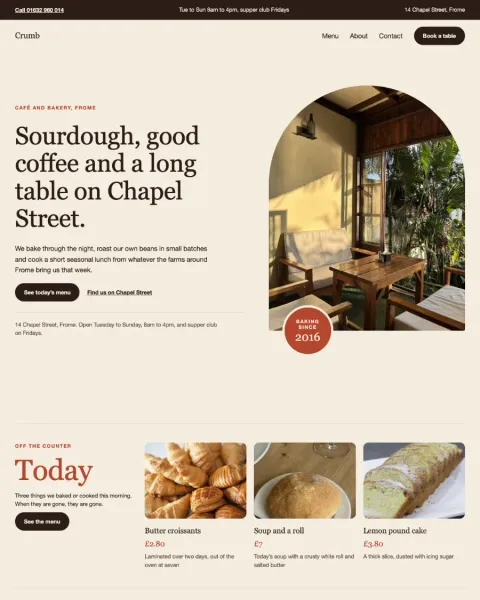
Crumb Café and bakery
See Crumb as whole pagesMend Physiotherapy clinic
See Mend as whole pagesVow Wedding website
See Vow as whole pagesSpur Electrician and plumber
See Spur as whole pagesBough Tree surgeon
See Bough as whole pagesTape Podcast
See Tape as whole pagesCounsel Law firm
See Counsel as whole pagesEditorial postscript
Authored font stack with theme and device fallbacks
Story three generations
Authored font stack with theme and device fallbacks
Team introduction and face grid
Authored font stack with theme and device fallbacks
Product team roster
Authored font stack with theme and device fallbacks
Team names over portraits
Authored font stack with theme and device fallbacks
About suppliers miles
Authored font stack with theme and device fallbacks
Team wedding party aisle
Authored font stack with theme and device fallbacks
About pull quote photo
Authored font stack with theme and device fallbacks
About stacked plates
Authored font stack with theme and device fallbacks
About suppliers miles
Authored font stack with theme and device fallbacks
About stacked plates
Authored font stack with theme and device fallbacks
Studio Partners
Authored font stack with theme and device fallbacks
Portrait contact sheet
Authored font stack with theme and device fallbacks
Open studio roster
Authored font stack with theme and device fallbacks
People behind it
Authored font stack with theme and device fallbacks
Try a shorter search or choose another category.
Showing 1–34 of 34 · Featured first
Looking for sections that move? 58 interactive patterns on their own page
Any theme
The same section in each theme below, word for word. The pattern brings the layout; the colours and fonts are the theme’s, so it matches the rest of your site.
34 patterns
| Pattern | What it is | Notable blocks | Variations | Access |
|---|---|---|---|---|
| About day in hours | An about-us story told as the business’s working day. | Image | 2 | Subscription |
| About founder story | An about-page story told by the founder. | Image | 5 | Subscription |
| About pull quote photo | A founder’s story led by a large pull quote on a plate that laps up over an offset pair of photographs, a tall one and a shorter one dropped lower, with a signed attribution, a short paragraph and a text link. | Image | 2 | Subscription |
| About stacked plates | An about-us story set as three stacked plates. | Image | 3 | Subscription |
| About suppliers miles | Where the food comes from. | Columns, Group | 3 | Subscription |
| Clinician week rota | A small team's week as a rota. | Group | 2 | Subscription |
| Editorial postscript | A founder's note as a letter. | Group | 2 | Subscription |
| Engineer ID card | A trust section for a trade. | Image | 2 | Subscription |
| Open studio roster | Four large names make a ruled studio roster. | Details, Image | 2 | Subscription |
| People behind it | A centred team introduction above four portrait cards with circular headshots, names, roles, short notes and actions. | Cover | 2 | Subscription |
| Portrait contact sheet | Six numbered portrait cards alternate crop heights to create a contact sheet, each with a name, role, short note and profile action. | Image | 2 | Subscription |
| Product team roster | Four full-height portrait cards place name, role and a short biography on a separate plate below each face. | Image | 3 | Subscription |
| Story three generations | A family business told as three generations. | Image | 2 | Subscription |
| Story two voices | How we met, told twice. | Cover | 2 | Subscription |
| Studio Index | A numbered studio roster with visible portraits and biographies, plus native disclosures for each person’s practice. | Details, Image, Separator | 2 | Subscription |
| Studio Partners | Two portrait led partner profiles with large quotes and individual actions. | Image | 2 | Subscription |
| Team alternating profiles | Three broad profile spreads alternate the portrait side, giving each person room for a biography and a personal approach. | Image | 1 | Subscription |
| Team cover frieze | A heading row, then four tall portrait covers set edge to edge across the full width with no gutter, so the team reads as one continuous frieze. | Cover | 2 | Subscription |
| Team department columns | Three department columns each open with a large portrait and named lead, then introduce a colleague through a smaller face and short profile. | Image | 1 | Subscription |
| Team founders diptych | Two generous portraits sit side by side, with separate biographies and a shared studio statement beneath. | Image | 1 | Subscription |
| Team grid | Six people across two even rows of three, each a 4. | Image | 1 | Free |
| Team hosts band | A two-person introduction on a dark band. | Media & Text | 2 | Subscription |
| Team introduction and face grid | An introduction occupies one side of the section, opposite a compact responsive grid of nine square portraits and names. | Image | 3 | Subscription |
| Team lead portrait | One person opens the section. | Image | 2 | Subscription |
| Team names over portraits | Two people side by side, each a tall portrait with their first name at large display size on a dark band laid across its foot, then two short paragraphs. | Cover | 2 | Subscription |
| Team numbered profiles | Three numbered profiles set oversized index marks beside portraits and focused biographies on an inverted section ground. | Image | 2 | Subscription |
| Team oval portraits | Four tall oval portraits sit above numbered name-and-role captions, bringing a softer silhouette to a tightly measured team row. | Image | 1 | Subscription |
| Team portrait mosaic | Six profiles form two interlocking arrangements of one tall portrait and two smaller portraits, with every name outside the image. | Image | 1 | Subscription |
| Team portraits | Six people in two ruled strips of three, each a 2. | Image | 2 | Subscription |
| Team profile cards | Six bordered profile cards pair a small square face with a role, followed by a name and short biography. | Image | 1 | Free |
| Team roster | The whole team as a ruled directory. | Image | 1 | Subscription |
| Team roster by desk | The studio as a directory in three named desks. | Image | 1 | Subscription |
| Team small business | The people of a small local business as four equal tiles. | Image | 6 | Subscription |
| Team wedding party aisle | A wedding party on an inverted slab, the two sides facing each other across an aisle. | Columns, Group | 2 | Subscription |
Guide
A team section needs no team-member plugin: each person is a photograph, a name and a role, laid out with core blocks. It tells a visitor who they will deal with. A name, a role and one human line each does more than a paragraph of credentials; link out to a full bio when someone needs one.
Matched portraits matter more than expensive ones. For a large team, a compact grid keeps everyone the same size; for two or three founders, a larger layout with a sentence each is warmer.
Use the same crop for every portrait. Give each person a name and a role; add a line of biography only when the page has room for it.
New to patterns? Learn how to copy and paste a pattern. Read how we test patterns.
FAQ
Open a pattern, choose a variation and press Copy pattern. In the block editor, click into an empty paragraph and press Cmd+V on Mac or Ctrl+V on Windows: the section arrives as ordinary blocks you edit like any other.
Yes. Each person is an Image for the portrait, a Heading for the name and a Paragraph for the role, grouped together and laid out in columns or a grid. Copy a pattern here, paste it into the editor and swap in your own photographs and names; there is no team-member plugin to install or keep updated.
Yes. Each person is their own group of blocks: duplicate one in the List View to add a person, or delete one to remove them.
Retake them against one wall in the same light, even on a phone: a matched set looks better than a mix of studio portraits and holiday crops.
No. All 34 are built from core WordPress blocks, such as Image, so they paste into the block editor with nothing to install.
Yes. Every pattern's first variation names no colour or font of its own: it takes your theme's palette, type and spacing when pasted. 29 Styled looks bring their own colours, and each is labelled Styled.
Yes, 2, marked Free in the At a glance table on this page. They copy without an account and are among 64 free Core Patterns; a subscription opens the rest.
Subscribe
Yearly plans
Every pattern, template and theme download, and new patterns as we release them.
Checking your account.
Yearly plans
Every pattern and styled look, every theme (whole pages, a theme download, or a whole website started in one click) and the Pro plugin, on unlimited websites. The interactive patterns are on Everything.
Billed once a year
What you copy is yours forever. Not for you? We refund within 14 days.
Unlimited covers your own sites and the sites you build for clients; an account may not be pooled or resold between unrelated businesses. Everything you copy is yours to keep, forever, on any site; access to the rest of the library runs while you subscribe. Not for you? Tell us within 14 days of a payment and we refund you. After that, cancelling stops the next renewal and access runs to the end of the year you have paid for. Prices are in pounds and are the full price in the UK, the US and eleven other countries; elsewhere the checkout adds your local VAT or sales tax. The terms name every country. If the renewal price changes, we will email you at least 30 days before it applies.
Already subscribed?
Pro, £49 a year
Sign in to continue
Your subscription lives on your account. Sign in, or create one here, and you go straight on to payment.
Not got an account?
A password is at least 8 characters. Trouble signing in? [email protected]
You are subscribed
Every page arrives as a draft, with the header, footer, menu and pictures. Nothing is published until you say.
Your plan, on unlimited websites. Your card, invoices, plan changes and cancellation are in Stripe's billing portal.
The Interactive Patterns come with Everything. Manage billing moves you up, and you pay only the difference.
Payment is handled by Stripe; we never see your card.