


- 64 patterns
- 79 styled looks
- No plugin needed
Free WordPress block patterns
Copy free WordPress block patterns into the Gutenberg editor without an account. Start with a complete section and customise it in your block theme.


Free, 64 patterns
64 patterns shown
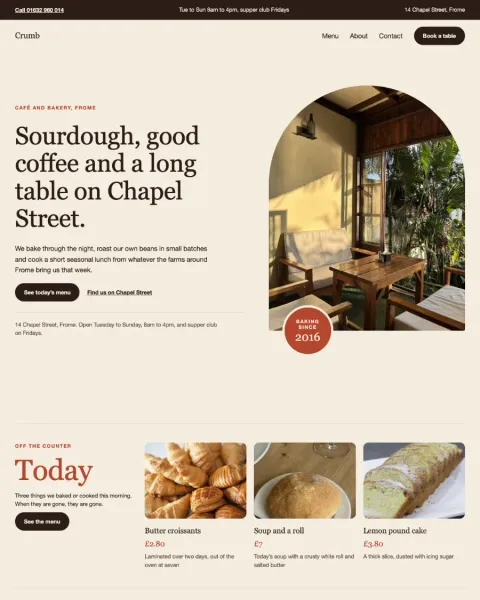
Crumb Café and bakery
See Crumb as whole pagesMend Physiotherapy clinic
See Mend as whole pagesVow Wedding website
See Vow as whole pagesSpur Electrician and plumber
See Spur as whole pagesBough Tree surgeon
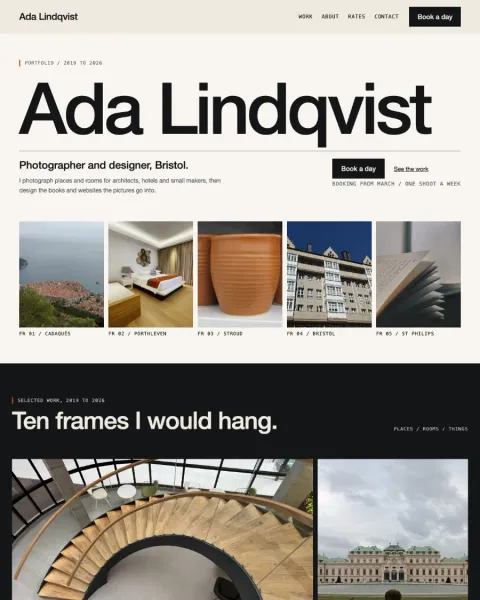
See Bough as whole pagesFolio Freelance photographer and designer
See Folio as whole pagesTape Podcast
See Tape as whole pagesCounsel Law firm
See Counsel as whole pages


Counsel, Footer local business
ProFooter local business
Authored font stack with theme and device fallbacks
Clubhouse and cream, Cover seam stamp
ProCover seam stamp
Authored font stack with theme and device fallbacks
Bough, Footer local business
ProFooter local business
Authored font stack with theme and device fallbacks
Bough, Reviews score summary
ProReviews score summary
Authored font stack with theme and device fallbacks
Folio, Availability calendar
FreeAvailability calendar
Authored font stack with theme and device fallbacks
Spur, Footer local business
ProFooter local business
Authored font stack with theme and device fallbacks
Folio, Gallery darkroom wall
FreeGallery darkroom wall
Authored font stack with theme and device fallbacks
Folio, Hero name and contact strip
FreeHero name and contact strip
Authored font stack with theme and device fallbacks
Mend, Footer local business
ProFooter local business
Authored font stack with theme and device fallbacks
Mend, Reviews score summary
ProReviews score summary
Authored font stack with theme and device fallbacks
Crumb, Footer local business
ProFooter local business
Authored font stack with theme and device fallbacks
Crumb, Reviews score summary
ProReviews score summary
Authored font stack with theme and device fallbacks
Almond and bordeaux, Page header rule
ProPage header rule
Authored font stack with theme and device fallbacks
Mist and eucalyptus, Feature alternating
ProFeature alternating
Authored font stack with theme and device fallbacks
Navy and signal yellow, Feature grid
ProFeature grid
Authored font stack with theme and device fallbacks
Linen and petrol, Feature lead and list
ProFeature lead and list
Authored font stack with theme and device fallbacks
Buttermilk and pillar red, Why choose us checklist
ProWhy choose us checklist
Authored font stack with theme and device fallbacks
No patterns match
Try a shorter search or choose another category.
Showing 1–48 of 64 · Featured first
Looking for sections that move? 58 interactive patterns on their own page
Any theme
Paste a section and it takes your theme.
The same section in each theme below, word for word. The pattern brings the layout; the colours and fonts are the theme’s, so it matches the rest of your site.
64 patterns
At a glance
| Pattern | What it is | Notable blocks | Variations | Access |
|---|---|---|---|---|
| 404 page | A 404 page built as one mark. | Group | 2 | Free |
| Article body: classic | A full-length everyday article with an opening story, four sections, a practical list, a wide captioned photograph and a block quotation. | Image, List, Quote | 1 | Free |
| Author profile: compact row | An author sign-off with a small portrait, name, area of expertise and a realistic two-paragraph biography. | Image | 1 | Free |
| Availability calendar | The next six months at a glance, as a wall planner of month tiles. | Columns, Group | 2 | Free |
| Case study spread | One project told in full on a dark slab. | Image | 2 | Free |
| Contact ledger | A contact section with no form in it. | Columns, Group | 4 | Free |
| Contact sheet | Six square frames packed three across in two rows, with a tight gutter so the six read as one printed sheet, each frame numbered under a hairline rule. | Image | 2 | Free |
| Contact split | A contact section with no form in it. | Columns, Group | 6 | Free |
| Cover plate | A full-bleed cover on your own photograph with a paper plate grown out of its bottom-left corner carrying the eyebrow, headline and one line. | Cover | 5 | Free |
| Cover seam stamp | Two full-height photographs side by side at full bleed with no gap. | Cover | 2 | Free |
| Cover trio | Three photograph frames in a row, each a cover with a small caption plate in its bottom-left corner, and the middle frame raised above the other two. | Cover | 3 | Free |
| Cover veil | A full-bleed cover whose photograph is reduced to grain behind a display headline by a heavy veil of your theme's contrast colour. | Cover | 5 | Free |
| Cover window | A full-bleed cover whose photograph sits under a heavy veil of your theme's contrast colour, with display type on one side and, on the other, a second cover showing the same photograph with no veil at all, with the same focal point, so it reads as a window cut through the veil. | Cover | 2 | Free |
| CTA band | A full-bleed closing band that inverts the page. | Separator | 2 | Free |
| CTA call now | An emergency band for a trade that answers the phone at night. | Columns, Group | 6 | Free |
| FAQ cards | An FAQ as a wall of bordered cards. | Columns, Group | 5 | Free |
| FAQ ledger | A display headline over three topic rows. | Details, Separator | 2 | Free |
| Feature alternating | Four feature rows, each a 4. | Image | 3 | Free |
| Feature checklist matrix | A comprehensive multi-category capability matrix in a fixed core table. | Table | 2 | Free |
| Feature grid | An even three-column feature set with generous gutters, built around oversized index numerals set at display size where a small label would normally sit. | Separator | 3 | Free |
| Feature lead and list | One feature carried at display size across half the band, with three compact ruled entries opposite it. | Columns, Group | 3 | Free |
| Footer local business | A footer for a business people visit. | Group | 7 | Free |
| Footer nameplate | A paper footer that ends on the site name set enormous. | Separator | 4 | Free |
| Gallery darkroom wall | A selected-work wall on a dark slab. | Image | 2 | Free |
| Hero media and text | A hero built on Media & Text rather than columns, so the photograph runs off the side of the screen while the words stay on the page's own measure. | Media & Text | 4 | Free |
| Hero name and contact strip | A portfolio home hero where the person's name is the headline, set at the width of the page, then a hairline with one line of discipline and place, a short sentence, a filled and a text-link action and an availability note, then a strip of five photographs of equal height, each with a frame number and place beneath like a contact sheet. | Image | 2 | Free |
| Hero statement | An opening section with nothing in it but the sentence. | Group | 2 | Free |
| Hours week table | Opening hours as a timetable. | Columns, Group | 6 | Free |
| Lead and rail | One wide 16. | Image | 2 | Free |
| Listing cards | Six priced items as a grid of cards, each a 4. | Image | 3 | Free |
| Listing rows | A repeating ruled row for any index a visitor scans and acts on. | Separator | 4 | Free |
| Logo cells | Ten client logos in a five by two grid of ruled cells, hairlines running both ways and the frame closed on all four sides, so the band reads as a table of clients rather than a row of them. | Image | 1 | Free |
| Logo compact strip | A concise introduction anchors one end of a shallow band, with four image logos on the other side. | Image | 2 | Free |
| Nav bar | A header bar on one line. | Navigation | 6 | Free |
| Nav stack | A header built as a masthead rather than an app bar. | Navigation | 6 | Free |
| Nav utility bar | A local-business header in two bands. | Navigation | 6 | Free |
| Open letter | A statement set as a letter. | Separator | 1 | Free |
| Page header rule | The opening of an interior page, and nothing more. | Group | 10 | Free |
| Post header | Single-post furniture, built as a lit plate on an unlit band. | Post author name, Post date, Post terms, Post title | 3 | Free |
| Post query grid | A live Query Loop as three openings across. | Post author name, Post date, Featured Image, Post title, Query Loop | 2 | Free |
| Post query list | A live Query Loop as a dated index. | Post date, Post excerpt, Post title, Query Loop, Separator | 2 | Free |
| Pricing duo | Two ways to pay for the same thing, head to head and equal, with the saving set in the ruled channel that runs between them. | List, Separator | 1 | Free |
| Pricing tiers | Three pricing tiers where the recommended one is genuinely taller than its siblings and inverts to a contrast ground behind a 2px edge on that same chain, so the recommendation is structural rather than a badge. | List, Separator | 3 | Free |
| Quiet CTA | A closing ask that does not raise its voice. | Separator | 3 | Free |
| Quote break | A reading column broken by one quotation. | Separator | 3 | Free |
| Rates day sheet | A freelancer’s rates as one printed rate card. | List | 2 | Free |
| Reviews score summary | A review summary for a local business. | Columns, Group | 5 | Free |
| Side by side comparison | Two comparative cards side by side. | List | 2 | Free |
| Site footer | An inverted footer where the site name, set at display size, is the structure. | Separator | 3 | Free |
| Spec table | A two-column specification sheet in a core table, ruled between every row, hanging off one heavy rule with the section title beside it in the margin. | Table | 2 | Free |
| Split hero | An asymmetric hero with a headline, supporting copy and actions in one top-aligned column, beside a compact four-row facts panel. | Columns, Group | 2 | Free |
| Stat pillars | Three monolithic architectural pillars in 1px currentColor outline frames. | Columns, Group | 3 | Free |
| Stat quadrant | Four figures in a 2x2 inside a 1px currentColor plate, one hairline running the full width between the rows and one running the full height between the columns, both meeting the frame so the four figures sit in four panes of a window. | Columns, Group | 2 | Free |
| Steps cards | Four photographic process cards with level tops and descending feet. | Image | 5 | Free |
| Steps run | A process as one horizontal run. | Separator | 4 | Free |
| Team grid | Six people across two even rows of three, each a 4. | Image | 1 | Free |
| Team profile cards | Six bordered profile cards pair a small square face with a role, followed by a name and short biography. | Image | 1 | Free |
| Testimonial band | One client quote on a full-bleed inverted band. | Image | 2 | Free |
| Testimonial trio | Three testimonials across, each a 1px currentColor card holding one quote and an attribution locked to a hairline at its foot, the speaker's portrait beside the name. | Image | 3 | Free |
| The archive as a strip | A history taken in one pass. | Image | 1 | Free |
| Timeline axis | Five eras of one observatory hung across the page rather than down it. | Group | 2 | Free |
| Timeline rail | Six dated milestones hung on one continuous currentColor hairline. | Columns, Group | 2 | Free |
| Why choose us checklist | A single claim at display size on one side and six ruled check rows on the other, each a large tick, a short promise and one line of proof. | Columns, Group | 2 | Free |
| Work index ledger | A project index kept as a ledger. | Image | 2 | Free |
Guide
Choose a layout for your page
Try a layout on a draft page before choosing a subscription. Change the text and images, check it on your phone, and see how your theme changes the result.
New to patterns? Learn how to copy and paste a pattern. Read how we test patterns.
FAQ
Free WordPress block patterns: common questions
How do I add one of these Free WordPress block patterns to my site?
Open a pattern, choose a variation and press Copy pattern. In the block editor, click into an empty paragraph and press Cmd+V on Mac or Ctrl+V on Windows: the section arrives as ordinary blocks you edit like any other.
Do these Free WordPress block patterns need a plugin?
No. All 64 are built from core WordPress blocks, so they paste into the block editor with nothing to install.
Will they match my theme?
Yes. Every pattern's first variation names no colour or font of its own: it takes your theme's palette, type and spacing when pasted. 79 Styled looks bring their own colours, and each is labelled Styled.
Are any Free WordPress block patterns free?
Yes, 64, marked Free in the At a glance table on this page. They copy without an account and are among 64 free Core Patterns; a subscription opens the rest.