




Vanilla and scarlet, Footnoted figures
ProFootnoted figures
Authored font stack with theme and device fallbacks
Show product features and services with WordPress block patterns. Browse grids, image-and-text rows and highlighted features for the Gutenberg editor.
53 patterns shown
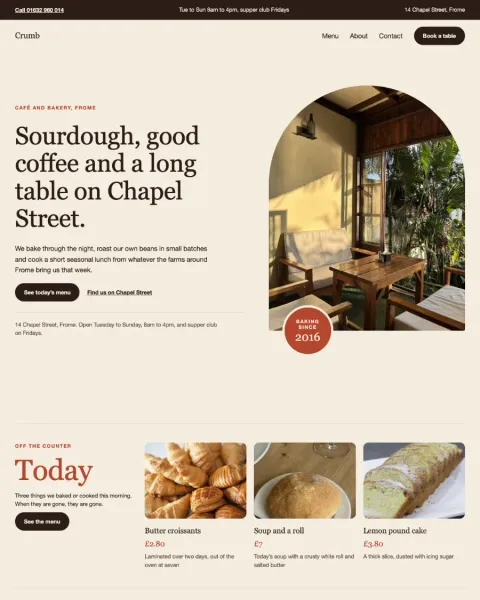
Crumb Café and bakery
See Crumb as whole pagesMend Physiotherapy clinic
See Mend as whole pagesVow Wedding website
See Vow as whole pagesSpur Electrician and plumber
See Spur as whole pagesBough Tree surgeon
See Bough as whole pagesCounsel Law firm
See Counsel as whole pagesFootnoted figures
Authored font stack with theme and device fallbacks
Practice both sides
Authored font stack with theme and device fallbacks
Practice detail rows
Authored font stack with theme and device fallbacks
Practice sector index
Authored font stack with theme and device fallbacks
Before and after pairs
Authored font stack with theme and device fallbacks
Cover lit column
Authored font stack with theme and device fallbacks
Arisings recycled figures
Authored font stack with theme and device fallbacks
Season calendar strip
Authored font stack with theme and device fallbacks
Services tree work glossary
Authored font stack with theme and device fallbacks
Callout response clock
Authored font stack with theme and device fallbacks
Services consumer unit
Authored font stack with theme and device fallbacks
About suppliers miles
Authored font stack with theme and device fallbacks
Appointment letter checklist
Authored font stack with theme and device fallbacks
Conditions head to foot
Authored font stack with theme and device fallbacks
Values three principles
Authored font stack with theme and device fallbacks
About suppliers miles
Authored font stack with theme and device fallbacks
Catering order steps
Authored font stack with theme and device fallbacks
Feature circle badges
Authored font stack with theme and device fallbacks
Values three principles
Authored font stack with theme and device fallbacks
Venue spaces capacity
Authored font stack with theme and device fallbacks
Feature alternating
Authored font stack with theme and device fallbacks
Feature grid
Authored font stack with theme and device fallbacks
Feature lead and list
Authored font stack with theme and device fallbacks
Services photo cards
Authored font stack with theme and device fallbacks
Why choose us checklist
Authored font stack with theme and device fallbacks
Working disciplines
Authored font stack with theme and device fallbacks
Product workbench
Authored font stack with theme and device fallbacks
Studio capabilities
Authored font stack with theme and device fallbacks
Try a shorter search or choose another category.
Showing 1–48 of 53 · Featured first
Looking for sections that move? 58 interactive patterns on their own page
Any theme
The same section in each theme below, word for word. The pattern brings the layout; the colours and fonts are the theme’s, so it matches the rest of your site.
53 patterns
| Pattern | What it is | Notable blocks | Variations | Access |
|---|---|---|---|---|
| About suppliers miles | Where the food comes from. | Columns, Group | 3 | Subscription |
| App integrations grid | A headline and intro over a grid of twelve ruled tiles. | Group | 1 | Subscription |
| Appointment letter checklist | What to bring to a first appointment, set as the confirmation letter itself. | Group | 2 | Subscription |
| Arisings recycled figures | A figures section on an inverted slab where one number carries it. | Image | 2 | Subscription |
| Before and after pairs | Recent work for a builder, a landscaper or a decorator, shown as three static before and after pairs. | Image | 3 | Subscription |
| Callout response clock | A call-out section where the day is drawn to scale. | Columns, Group | 2 | Subscription |
| Case study summary | One project told as a case study. | Image | 3 | Subscription |
| Catering order steps | Ordering catering for an office or a party in three steps, each led by its lead time as a large figure (48 hours, the day before, collect at 8) under a heavy rule, then a plate with the starting price and one button. | Columns, Group | 2 | Subscription |
| Clients seam stack | Four giant words stacked down the page, each cut by a seam, with numbering above the seam and one sentence and a small practice label below it. | Columns, Group | 2 | Subscription |
| Conditions head to foot | What a clinic treats, as an index of the body read top to bottom. | Columns, Group | 2 | Subscription |
| Cover lit column | A display heading and lede on your page ground over a full-bleed band of four tall photographs set edge to edge. | Cover | 2 | Subscription |
| Dress code swatches | A dress code set out as a swatch card. | Cover, List | 2 | Subscription |
| Feature alternating | Four feature rows, each a 4. | Image | 3 | Free |
| Feature bento asymmetric | An asymmetrical 3-card bento grid pairing one tall hero pillar card on the left with two stacked capability panels on the right, creating a distinct hierarchy of importance. | Image | 1 | Subscription |
| Feature circle badges | Four large circles in a poster row, alternately filled and outlined, each holding one figure a customer cares about, with a short caption under it and a call or booking action beneath the row. | Cover | 3 | Subscription |
| Feature cluster micro | A dense six-card grid (3x2) built with clean hairline borders, compact typography, and distinct category tags for detailed capability scanning. | Group | 1 | Subscription |
| Feature cover bento | A short heading row, then a bento of three photograph tiles. | Cover | 2 | Subscription |
| Feature grid | An even three-column feature set with generous gutters, built around oversized index numerals set at display size where a small label would normally sit. | Separator | 3 | Free |
| Feature heroic spotlight | A cinematic feature showcase pairing a prominent hero media plate with a 3-column capability foundation underneath. | Image | 1 | Subscription |
| Feature image sidelap | A tall, generous photograph meets an opaque inverted text panel that overlaps its side, with a large heading and a compact feature line. | Image | 1 | Subscription |
| Feature landscape lap | A broad landscape photograph with a large paper text panel overlapping its lower edge, an oversized heading and one clear action. | Image | 1 | Subscription |
| Feature lead and list | One feature carried at display size across half the band, with three compact ruled entries opposite it. | Columns, Group | 3 | Free |
| Feature media callout duo | Two stacked landscape feature cards pairing 16. | Image | 1 | Subscription |
| Feature pill ledger | A horizontal list ledger pairing structured feature capability rows with right-aligned metric badge callouts. | Columns, Group | 1 | Subscription |
| Feature plate inset | An enclosing plate container nesting two contrasting sub-cards with distinct internal padding and structural dividing rules. | Image | 1 | Subscription |
| Feature portrait pair | Two generous portrait photographs, each with an inset paper caption overlapping its foot and a large editorial feature heading. | Image | 1 | Subscription |
| Feature quadrant hub | A 2x2 feature matrix divided by continuous structural intersecting rules with numbered corner indices, giving equal structural presence to four core pillars. | Columns, Group | 1 | Subscription |
| Feature rows | A feature set as four full-width ruled rows in which the hierarchy is upside down. | Columns, Group | 2 | Subscription |
| Feature ruled trio | Three vertical feature columns framed by vertical hairline borders with oversized display index numbers and crisp architectural typography. | Columns, Group | 1 | Subscription |
| Feature spine | A feature set built around one unbroken hairline, with short points and WordPress photographs alternating across the centre. | Image | 2 | Subscription |
| Feature split dense | An asymmetrical 40/60 split pairing a strong left-hand headline pillar with a dense four-row capability ledger on the right. | Columns, Group | 1 | Subscription |
| Feature stagger strip | Three vertical feature columns arranged in a staggered descending rhythm with top margin offsets and hairline-bordered cards. | Image | 1 | Subscription |
| Footnoted figures | Figures that show their working. | Group | 2 | Subscription |
| Law practice areas | Six ruled rows under a headline. | Columns, Group | 1 | Subscription |
| Lead over three | One feature carried across the top of the band at display size, with three compact ruled entries in a row beneath it. | Columns, Group | 1 | Subscription |
| Loyalty stamp card | A coffee loyalty card drawn in blocks. | Cover | 2 | Subscription |
| Menu dish anatomy | One signature dish photographed in the middle, its four parts labelled around it. | Image | 2 | Subscription |
| Practice both sides | Two ruled lists side by side, one for each kind of client on a practice page, under a heading, with a sentence on why acting for both matters and a button below. | Columns, Group | 2 | Subscription |
| Practice detail rows | Six ruled rows of native details blocks with large names. | Details | 2 | Subscription |
| Practice sector index | A heading over two ruled indexes that read across one band. | Columns, Group | 2 | Subscription |
| Product workbench | A product promise beside a framed list of four native Details drawers for reviewing visual work. | Details, Separator | 2 | Subscription |
| Season calendar strip | The year as one strip of twelve month cells, each naming the work that suits it. | Image | 2 | Subscription |
| Services bento | Six rounded service tiles locked into a bento grid. | Image | 2 | Subscription |
| Services consumer unit | A trade's services drawn as a consumer unit. | Group | 2 | Subscription |
| Services photo cards | Six service cards for a trade or local business, each a 4. | Image | 2 | Subscription |
| Services tree work glossary | A services section written as a glossary. | Image | 2 | Subscription |
| Signal field | A three-part editorial header above a narrow field label and four numbered capability cells, closed by a quiet action. | Columns, Group | 2 | Subscription |
| Specials today band | A band between two rules that leads with the word Today at display size, a line and one action, then three dishes, each a landscape photograph with its name, price and a short note. | Image | 2 | Subscription |
| Studio capabilities | An oversized studio promise above a still, composed two by two field of service words. | Separator | 2 | Subscription |
| Values three principles | An about-page values band. | Columns, Group | 4 | Subscription |
| Venue spaces capacity | Three hireable spaces for an events venue, each a photograph, the room name, its standing and seated capacity set as two display figures between rules, a line of what is included and an Enquire button on the foot. | Image | 3 | Subscription |
| Why choose us checklist | A single claim at display size on one side and six ruled check rows on the other, each a large tick, a short promise and one line of proof. | Columns, Group | 2 | Free |
| Working disciplines | A wide editorial introduction above four spacious, numbered service cards in a balanced two by two composition. | Columns, Group | 2 | Subscription |
Guide
A features section answers “what do I get?” in the reader’s words, not yours. Lead each item with the outcome, then the detail: “Booked in two minutes” beats “Online scheduling engine”.
Match the layout to how many points you have and how much each needs. Three to six short points read well as a grid; two or three that need a photograph each want alternating rows; one big promise with supporting points wants a lead item and a list.
Use a grid for equally important benefits, alternating rows when each feature needs an image, and a spotlight layout when one capability deserves the most attention.
New to patterns? Learn how to copy and paste a pattern. Read how we test patterns.
FAQ
Open a pattern, choose a variation and press Copy pattern. In the block editor, click into an empty paragraph and press Cmd+V on Mac or Ctrl+V on Windows: the section arrives as ordinary blocks you edit like any other.
Three to six. Past six, readers stop comparing and start skimming: put the rest on a page of their own and link to it from the section.
Core WordPress has no icon block, so these lead with numbers, photographs or words instead. To add icons, insert them as small images from your Media Library.
No. All 53 are built from core WordPress blocks, such as Image, so they paste into the block editor with nothing to install.
Yes. Every pattern's first variation names no colour or font of its own: it takes your theme's palette, type and spacing when pasted. 36 Styled looks bring their own colours, and each is labelled Styled.
Yes, 4, marked Free in the At a glance table on this page. They copy without an account and are among 64 free Core Patterns; a subscription opens the rest.
Subscribe
Yearly plans
Every pattern, template and theme download, and new patterns as we release them.
Checking your account.
Yearly plans
Every pattern and styled look, every theme (whole pages, a theme download, or a whole website started in one click) and the Pro plugin, on unlimited websites. The interactive patterns are on Everything.
Billed once a year
What you copy is yours forever. Not for you? We refund within 14 days.
Unlimited covers your own sites and the sites you build for clients; an account may not be pooled or resold between unrelated businesses. Everything you copy is yours to keep, forever, on any site; access to the rest of the library runs while you subscribe. Not for you? Tell us within 14 days of a payment and we refund you. After that, cancelling stops the next renewal and access runs to the end of the year you have paid for. Prices are in pounds and are the full price in the UK, the US and eleven other countries; elsewhere the checkout adds your local VAT or sales tax. The terms name every country. If the renewal price changes, we will email you at least 30 days before it applies.
Already subscribed?
Pro, £49 a year
Sign in to continue
Your subscription lives on your account. Sign in, or create one here, and you go straight on to payment.
Not got an account?
A password is at least 8 characters. Trouble signing in? [email protected]
You are subscribed
Every page arrives as a draft, with the header, footer, menu and pictures. Nothing is published until you say.
Your plan, on unlimited websites. Your card, invoices, plan changes and cancellation are in Stripe's billing portal.
The Interactive Patterns come with Everything. Manage billing moves you up, and you pay only the difference.
Payment is handled by Stripe; we never see your card.